Although the views from these 9 Panos is quite amazing in itself, the main action happens BEHIND the "Hanging Gardens" with 7 Levels of Shops etc.
But firstly to give an idea of size here is a comparison to the Sydney Cricket Ground at the same scale.

For Jewel on a given floor there are about 120 Panos (for the outer rings) arranged around a circle (or in fact an oval) so that works perfectly as a clock with "Entry Point" Panos at each HOUR. Here is a screenie of Level 5 which you will see if you select "VIEW L5" in the Top Frame (once you open the Web-App).
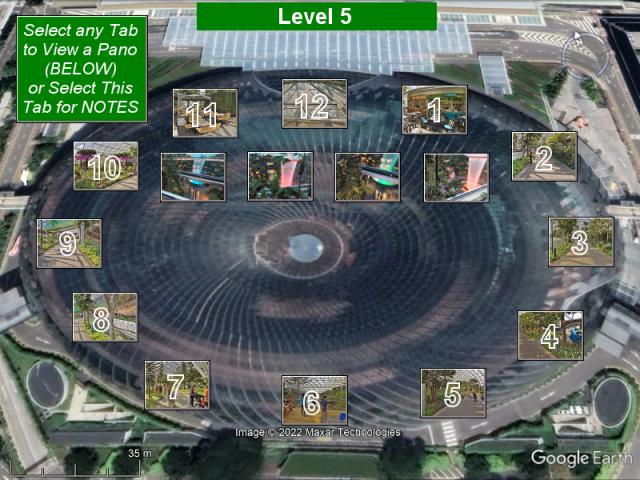
For example if you select 6 o'clock you will get a Pano like this

and by clicking the right arrow about 10 times (not here - on the Web-App) you will see 10 more Panos from 6 o'clock to 5 o'clock. So that's the way to go - there are 12 of these o'clock Entry Points on 7 Levels to allow you to get to know all about Jewel the BUILDING.
You will also notice that this particular Google Trekker exercise has been configured with "Levels" so there is a series of tabs on the right that allow you to select the 7 different levels. This works WITH the tabs of this Web-App. For example to continue as above, having selected 6 o'clock on Level 5 as an Entry Point you can then go to the 6 o'clock position on any other level and continue your Virtual Tour.
You can contact me at info@camosdigitalnomadservices.com
Press  to go to the Web-App.